
How to Choose an AI Voice That Fits Your Brand
Choose a brand voice with an audition script and scorecard for clarity, tone, pronunciation, and consistency across tutorials, promotions, and support audio.
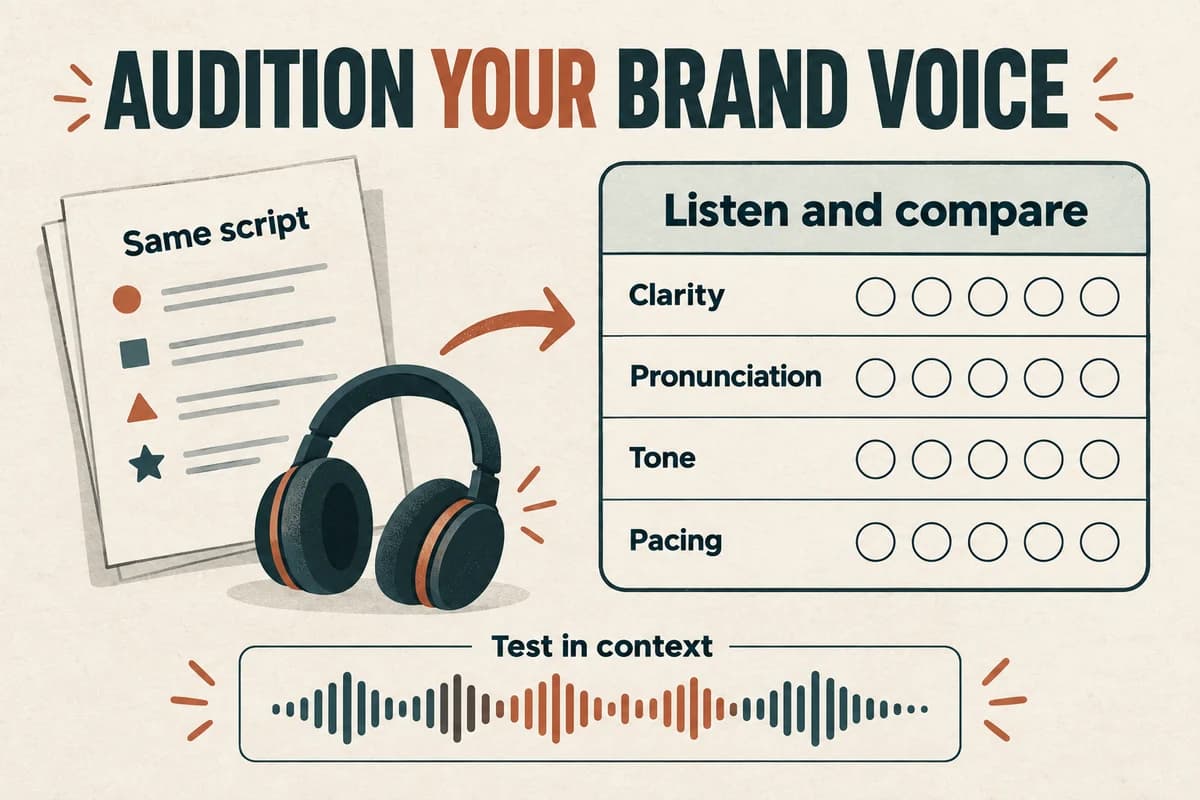
Choose an AI voice by testing a short, representative script against a written brief. Evaluate clarity, pronunciation, tone, and suitability for the listening context, then hear the leading choice in a complete piece before committing to a series.
A label such as “friendly,” “professional,” or “energetic” is only a starting point. The useful question is how the voice handles your actual product names, explanations, and calls to action.
Describe the experience the audience needs
Begin with the situation in which someone will hear the voice. A product tutorial, a short promotion, and a service-status update ask for different kinds of delivery.
For a tutorial, you might want listeners to feel oriented and able to follow the next step. For an introduction, you may want curiosity and momentum. For a support message, calm clarity may matter most.
Translate brand adjectives into observable choices. “Helpful” can mean explaining unfamiliar terms, leaving space around instructions, and avoiding a scolding tone. “Confident” can mean clear sentence endings and direct wording, without exaggerated emphasis.
Avoid choosing by stereotypes about age, gender, or accent. Describe the communication task and evaluate whether the voice serves it for the intended audience.
Write a one-paragraph brief before auditioning so attractive samples do not quietly change the project's purpose.
Create an audition script with real difficulty
Use a compact script that includes the material the voice will encounter repeatedly.
For a fictional workspace app, an audition might read:
“Welcome to Cedar Desk. First, open your project and choose Add task. Set the review date to October twenty-third. If you do not know the owner yet, leave that field blank. You can update it before you send the task for review.”
This sample tests a product name, an interface label, a date, an exception, and a longer closing sentence. Adjust those elements to your actual project.
Add one promotional line and one neutral instructional line if the voice must cover both. A voice that suits an enthusiastic opening may handle a quiet explanation less comfortably.
Keep the wording the same across auditions. Changing the script for every candidate makes it harder to know whether you prefer the voice or the copy.
Use a scorecard with explicit priorities
Score each sample from one to five on the criteria that matter to your brief:
- Clarity: can the listener understand the words on first hearing?
- Pronunciation: are names and recurring terms correct?
- Tone: does the delivery fit the situation?
- Pacing: is there room to follow the information?
- Range: does the voice handle both short and longer sentences?
- Consistency: do repeated samples remain suitable for the project?
You can weight criteria if needed. For example, a technical course might prioritize pronunciation and clarity over dramatic expression.
Add a notes field with concrete observations. “The date is rushed” is more useful than “not quite right.” A candidate may become suitable after a script adjustment, while another may consistently struggle with a required name.
Compare samples at a similar listening level. Otherwise a louder example may feel more impressive for reasons unrelated to the voice's usefulness.
Test in context with actual listeners
Put the leading sample into the intended medium: the tutorial video, podcast opening, help page, or presentation. Add the real visuals or music when those are part of the experience.
Ask a few representative reviewers to complete a task or describe what they heard. “What should you do next?” reveals more than a preference poll about which voice sounds nicest.
For a support message, ask whether the listener understood the issue and next step. For a tutorial, ask them to follow the demonstrated action. For an introduction, ask what they expect the piece to deliver.
Record feedback without treating a small informal review as proof about every customer. The purpose is to find obvious mismatches and misunderstandings before release.
If pronunciation is the only issue, test a targeted correction before replacing an otherwise suitable voice.
Decide whether a specific person's identity is needed
Some brands need a recognizable founder or contributor voice; many projects simply need a consistent narrator.
A voice based on a particular speaker brings additional decisions about authorization, source recordings, scope, review, and future use. A library voice has its own applicable usage conditions, but it may fit a project where the narrator's identity is flexible.
Our voice cloning versus text-to-speech guide explains how those approaches relate. Choose the method because it meets the brief, not because the label sounds more advanced.
If you work with a contributor, involve them in the approved sample and the boundaries of the project. Do not assume that approval of one campaign establishes permission for unrelated future messages.
Also avoid making the voice sound like a third party endorses the product when that is not the case.
Create a maintainable voice reference
Once a voice is approved, save the brief, audition text, approved sample, pronunciation notes, and the voice details available in your production tool.
Write a few rules for future scripts: how to introduce the product, how to read recurring abbreviations, how direct calls to action should be, and which kinds of exaggerated language to avoid.
Keep those rules focused on the audience's experience. A brand voice guide does not need to prescribe every pause; it needs to help the next writer and producer make compatible choices.
For new content, review a representative segment before producing the full batch. If the subject changes significantly, test whether the existing voice still suits it.
Use the voice-over quality checklist for release checks across the series. Consistency comes from repeatable writing and review as well as voice selection.
Try your audition script in VocalCopyCat, compare it with the brief, and save the sample that earns approval. A useful brand voice is one you can explain, evaluate, and keep working with.
Try Our Voice Clone Demo
Hear your words come to life
Choose a voice and try a short preview.
Listen to sample voices
Hear examples before choosing a voice. Generated results can vary with the script and reference sample.
Looking for another voice?
Explore the library and listen to a sample before you create.

Morgan Freeman

Stephen Hawking

Christiano Ronaldo

Donald Trump

Kokoro

Disney XD Announcer

Cute Japanese Girl
Vin

Adam Stone
Transform Your Content with AI Voice Technology Today
Try a short voice preview, then create speech and save your audio in a workspace built for your next project.
Generate Your Voice Now