
Dia2 Research: Streaming Dialogue and Speaker Context
Explore Dia2's streamed text input, two-speaker conditioning, and English dialogue limits, with a practical test for turn timing and consistent voice identity.
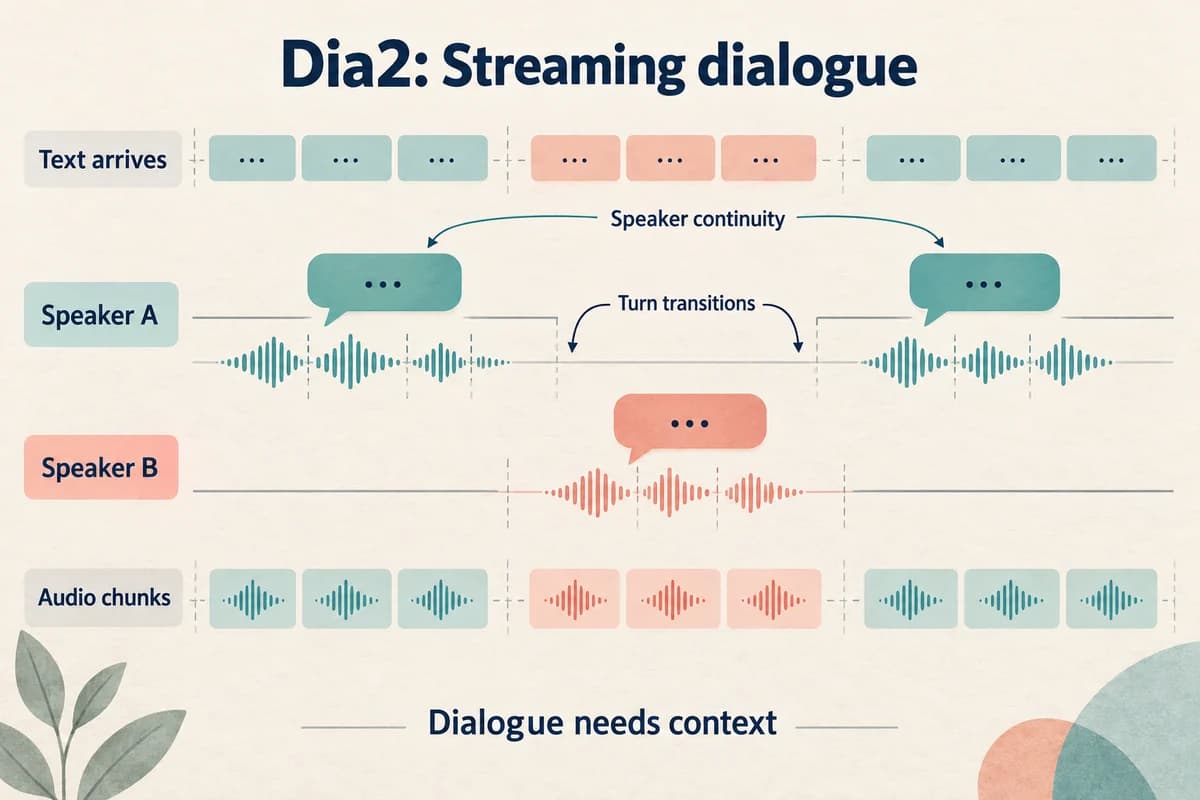
Dia2 is a research release for generating spoken dialogue while text arrives. Its most useful distinction is between a model capable of incremental generation and a complete application that streams reliable conversation to listeners. Evaluating one does not automatically establish the other.
Research reviewed September 17, 2026.
This review uses Nari Labs' repository and model card. It proposes experiments rather than reporting a benchmark, and it does not imply Dia2 is available inside VocalCopyCat.
Identify the scope of the release
Nari Labs describes Dia2 as a dialogue TTS model with one-billion and two-billion parameter checkpoints. It can begin generation without receiving the complete text, supports audio conditioning, and is documented for English generation of up to two minutes. The official repository is the primary implementation reference.
Those boundaries matter. A short, two-person English exchange is an appropriate starting point. A multilingual panel discussion or an uninterrupted hour-long show would require evidence beyond the documented scope.
The repository also cautions that unconditioned voices and quality vary. That is useful operational information: a randomly pleasing voice is not the same as a stable cast member you can reuse across a series.
Record the checkpoint and software revision before testing. A model name without its surrounding implementation is an incomplete experiment description.
Separate incremental text from delivered streaming
Suppose a text system produces, “I found the file,” followed a moment later by, “but it is an older revision.” A speech model that starts early must commit to a delivery before it has all the context.
That creates a useful evaluation question: does the first phrase sound complete when the second phrase needs it to remain open? Try several arrival patterns for the same final sentence and listen for misplaced endings.
The Dia2 model card lists a dedicated TTS server with real streaming support under upcoming work. This makes it especially important to distinguish the model's incremental capability from the readiness of a particular serving route.
Inspect the path you actually plan to use: incoming text, generated chunks, playback buffer, and listener. Test that path as a whole. Writing an audio file successfully does not demonstrate uninterrupted browser playback.
Design a dialogue that reveals turn problems
Use a compact scene with a purpose. For example, one speaker is preparing to publish a tutorial and the other notices the wrong file.
A suitable original test script is:
- Speaker one: “The tutorial is ready. Can I publish this version?”
- Speaker two: “Almost. The second example still uses the old menu.”
- Speaker one: “Good catch. I will replace that section first.”
- Speaker two: “Then we can review the final export together.”
This scene contains a question, a correction, acknowledgment, and closure. It gives reviewers more to assess than alternating greetings.
Translate speaker labels into the implementation's documented input format when running a test. Keep editorial labels in the script archive so writers can review the scene without learning model-specific notation.
The voice-over script template can help separate spoken lines from notes that should never be read aloud.
Check speaker context and continuity
The repository's conditioning examples use separate audio prefixes for the two speakers. It notes that prefix transcription adds preparation time. Include that work in the experiment rather than measuring only the final generation call.
Use authorized reference material with clearly distinguishable speakers. Ask whether the intended identity remains consistent after a turn change and whether one speaker's delivery appears to influence the other in an unwanted way.
Evaluate the beginning and ending of each turn. A speaker can sound stable within a sentence while changing unexpectedly when returning after an interruption.
For recurring characters, keep the same approved reference files across trials. Changing both the script and references makes a voice shift difficult to diagnose. Save the exact prefixes with each result, even if the filenames look familiar.
Measure conversational timing through listening
Turn timing is partly about meaning. A pause after a correction may communicate consideration; the same pause after a simple acknowledgment may sound like a stalled connection.
Ask reviewers to label gaps as comfortable, rushed, or disruptive before showing timing measurements. Then inspect the corresponding waveform or player timestamps. The measurements help locate problems; they do not replace the listening judgment.
Include short acknowledgments, questions, and a longer explanation. Test what happens when text arrives in small pieces and when it arrives in complete sentences, if the selected implementation supports both.
Keep setup time, first audio delay, and sustained playback separate. A model can perform well during steady generation while still imposing a noticeable delay when a new session starts.
These are suggested tests. No particular latency or hardware result is claimed here.
Preserve editorial control over a generated exchange
Natural-sounding dialogue can still be wrong. Review whether the correction is accurate, whether each line belongs to the right speaker, and whether the conversation implies a decision the script never authorized.
For a podcast segment, check the opening and transition into the next section. Our podcast intro and outro guide explains how a short exchange can orient listeners without turning into empty banter.
Do not keep a generated hesitation merely because it sounds realistic. Ask whether it helps the scene. Similarly, avoid adding excessive interruptions to prove that a system can handle conversation. The listener should follow the idea comfortably.
Retain the approved text and final audio together. If you edit out a phrase or combine takes, update the transcript so captions and written show notes reflect what listeners actually hear.
Choose an evaluation boundary before expanding
Start with a small set of short English scenes and define acceptable behavior: correct speaker assignment, complete text, stable identity, sensible turn transitions, and continuous playback through the intended interface.
Log every generation, including failures. If a promising take requires several retries, record that effort. Repeatability matters when a dialogue format must ship every week.
Keep application responsibilities visible. Response writing, fact checking, interruption policy, and user-interface playback need explicit design even when the speech model supplies convincing voices.
Dia2 is valuable as a research example of speech generation that can respond to arriving text and conversational audio context. A successful pilot should demonstrate those capabilities within a clearly defined scene and serving setup, with enough retained evidence to explain where the experience works and where it still needs engineering.
Try Our Voice Clone Demo
Hear your words come to life
Choose a voice and try a short preview.
Listen to sample voices
Hear examples before choosing a voice. Generated results can vary with the script and reference sample.
Looking for another voice?
Explore the library and listen to a sample before you create.

Morgan Freeman

Stephen Hawking

Christiano Ronaldo

Donald Trump

Kokoro

Disney XD Announcer

Cute Japanese Girl
Vin

Adam Stone
Transform Your Content with AI Voice Technology Today
Try a short voice preview, then create speech and save your audio in a workspace built for your next project.
Generate Your Voice Now