
MOSS-VoiceGenerator Research: Designing Voices in Words
Learn how MOSS-VoiceGenerator turns descriptions into voices, where its research finds limits, and how to build a repeatable voice-design audition.
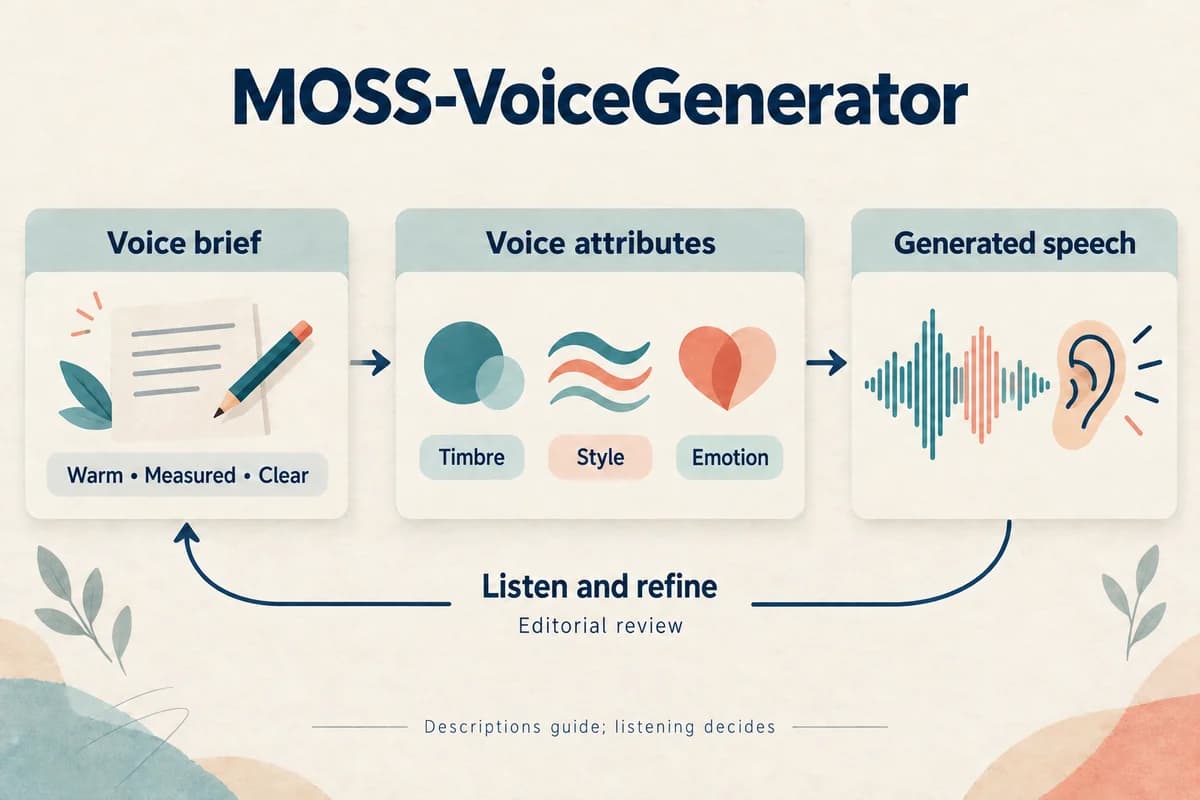
MOSS-VoiceGenerator explores creating a voice from a written description without requiring a reference recording. That makes its central task different from reproducing a known speaker: the operator must describe a useful voice, judge the resulting performance, and decide how to preserve a preferred design.
Research reviewed September 17, 2026.
This article interprets the research and proposes an audition workflow. It does not claim independent benchmark results or a MOSS-VoiceGenerator feature inside VocalCopyCat.
Identify the voice-design task
The March 30, 2026 paper describes instruction-driven voice generation trained using expressive cinematic speech. Its model combines the voice description and spoken text, using the MOSS delay-pattern architecture. The authors evaluate instruction following, naturalness, and overall preference. See the MOSS-VoiceGenerator paper.
The practical input is a description of a desired vocal performance, alongside the words to say. The official model card documents separate text and instruction fields.
This interface creates a design problem. “A great narrator” gives little guidance for either generation or review. A concrete brief, such as a calm instructor with deliberate phrasing, creates criteria a listener can actually assess.
The goal is not to imitate a named person. It is to define vocal qualities appropriate to the material.
Write a brief that listeners can evaluate
Start with the task, audience, and relationship. A guide helping a first-time user should sound different from a character telling an excited story to a friend.
Use a compact description with a few audible qualities. For example: “An adult narrator with a warm middle register, clear articulation, and an unhurried, conversational delivery. Explain each step patiently.”
This is an original example brief, not a guaranteed prompt recipe. Its value is that reviewers can discuss warmth, clarity, pace, and patience separately.
Avoid stacking incompatible requests such as whispering, projecting forcefully, speaking rapidly, and sounding unhurried. If two qualities matter in different scenes, audition them separately before asking one performance to combine them.
The brand voice selection guide can help turn vague preferences into criteria connected to the listener's needs.
Separate stable identity from temporary delivery
Some parts of a brief describe the desired voice across a project. Other parts describe how one line should be performed.
Create two editorial fields: Voice identity and Scene direction. A warm, lightly textured narrator might remain consistent, while a particular line requires surprise, reassurance, or concentration.
Even when an implementation takes one combined instruction, keep these fields separate in your planning document. That lets you identify whether a revision changes the character or merely changes the performance.
Try the same factual sentence with neutral, reassuring, and enthusiastic direction. Ask whether listeners still perceive the same intended voice concept. Do not assume identical wording guarantees an identical generated speaker across repeated requests.
If consistent identity is essential, evaluate and document the method used to carry an approved design into later production. A design audition and a reusable voice asset are different stages of the workflow.
Build an audition around actual material
Select three passages from the kind of work you intend to produce: an introduction, an explanation, and a transition. Keep them short enough that reviewers can compare several candidates without losing attention.
Generate candidates from a small number of clearly different briefs. Do not change the script between candidates at first. Otherwise listeners may prefer the writing and attribute that preference to the voice.
Ask reviewers to score suitability before personal preference. A voice can be appealing but wrong for a precise tutorial. Another can seem understated in isolation yet work well over a sequence of lessons.
Save the prompt, settings, and original audio for every candidate. Label the files neutrally during listening. After selection, reveal the briefs and discuss whether the perceived differences match the intended ones.
Read the research limitations as audition prompts
The paper limits language coverage to Chinese and English, reports uneven English style performance, and acknowledges occasional instability and possible preprocessing artifacts. Its preference results are author-run evaluations, rather than universal evidence of superiority.
Those caveats suggest useful trial cases. For English, include several styles actually needed by the project. For either language, repeat a few inputs and inspect whether a preferred design remains usable across generations.
Listen for distracting texture without confusing every breath or hesitation with a defect. A spontaneous character scene may benefit from irregularity; a procedural lesson may require a steadier delivery.
Our guide to natural-sounding AI voice emphasizes the relationship between writing, phrasing, and purpose. Use the same principle here: the right performance is the one that supports the scene.
Revise one design choice at a time
Suppose a candidate is clear but sounds too formal. Keep the script and most of the brief unchanged, then revise only the delivery direction toward ordinary conversation.
Listen again and describe the change precisely. Did sentence endings become less ceremonial? Did clarity remain intact? Did the apparent speaker change as well?
Keep a revision log with the original brief, the single intended change, the output identifier, and the listener's observation. This makes prompt iteration cumulative rather than a series of guesses.
When a change improves one passage but harms another, preserve both results. That may indicate the brief is suitable for a narrow scene rather than a whole series. A specialized voice can still be useful if its role is clearly bounded.
Preserve the chosen voice as a production decision
Once an audition succeeds, create a voice specification containing the brief, approved examples, intended uses, and examples of delivery to avoid. Keep the spoken text of each sample beside the audio.
If another synthesis stage uses the selected audio as a reference, evaluate that new stage separately. The model card describes the possibility of using VoiceGenerator as a design layer, but a successful audition does not prove every downstream system will preserve the same qualities.
Run a fresh passage through the complete intended workflow before committing to a large project. Check identity, pronunciation, delivery, and editability in the finished context.
MOSS-VoiceGenerator makes written voice design a concrete research subject. Its practical value depends on a disciplined audition: a brief grounded in audible traits, representative material, controlled revisions, and an explicit record of what makes the selected voice appropriate.
Try Our Voice Clone Demo
Hear your words come to life
Choose a voice and try a short preview.
Listen to sample voices
Hear examples before choosing a voice. Generated results can vary with the script and reference sample.
Looking for another voice?
Explore the library and listen to a sample before you create.

Morgan Freeman

Stephen Hawking

Christiano Ronaldo

Donald Trump

Kokoro

Disney XD Announcer

Cute Japanese Girl
Vin

Adam Stone
Transform Your Content with AI Voice Technology Today
Try a short voice preview, then create speech and save your audio in a workspace built for your next project.
Generate Your Voice Now