
Pocket TTS Research: Small Models for Local Speech
Understand Pocket TTS's continuous-audio research, CPU-focused design, language variants, and checks for local narration and responsive audio playback.
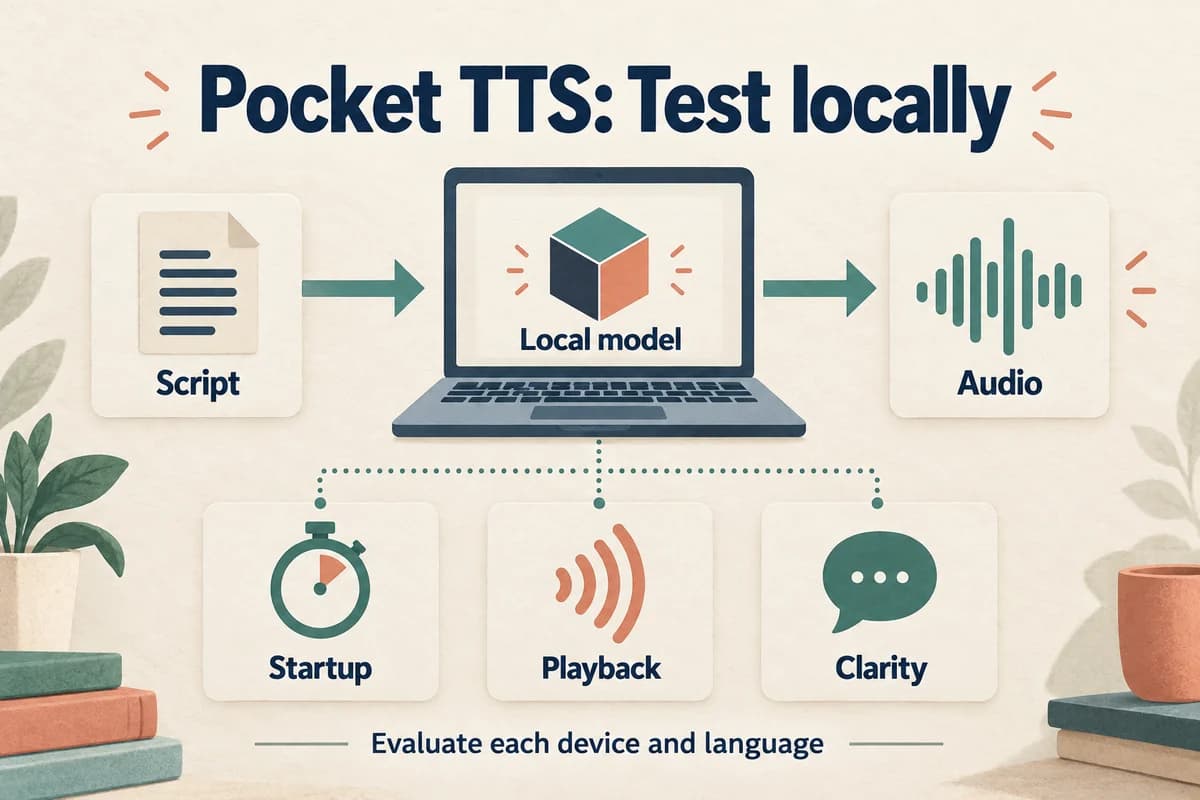
Pocket TTS is worth examining when the location and cost of speech generation matter as much as a polished demonstration. Its research points toward compact models that can generate speech on ordinary CPUs. The practical question is whether the exact model and device meet your quality, responsiveness, and workflow requirements.
Research reviewed September 17, 2026.
This is a review of published research and documentation. It does not report measurements on our hardware or claim that VocalCopyCat uses Pocket TTS.
Connect the product to its research
Kyutai's Continuous Audio Language Models paper studies a transformer that predicts contextual information and a smaller component that generates continuous audio frames. Its January 13, 2026 revision includes the release of Pocket TTS, a 100-million parameter model described as running faster than real time on a laptop CPU. See the research paper.
The important research direction is efficient generation through a continuous audio representation. It should not be reduced to “small models are always better.” A compact model can be attractive for one workload while a larger system remains preferable for another.
For an editorial team, the opportunity is concrete: experiment with narration without making every draft depend on a remote synthesis request. That opportunity still needs testing against the team's actual machines and scripts.
Define what local execution should mean
“Local” can refer to the model running on a device, the interface running in a browser, or files being saved on a computer. Those are different properties.
Before an offline experiment, identify where the weights, reference audio, generated files, and logs reside. Download required assets deliberately, then test the intended workflow without a network connection. Do not infer offline behavior from the appearance of a desktop interface.
If the goal is keeping unpublished material on one machine, inspect any surrounding software that handles the text. A locally executed model does not determine what an unrelated editor, synchronization service, or wrapper does.
Write a simple data-flow record: Script → Local model → Local audio file → Approved destination. Add any actual network step rather than hiding it behind the word “local.”
Compare cold starts with repeated work
The official repository describes CPU-oriented generation, streaming audio, voice cloning, and reusable voice states. It also distinguishes model loading and reference preparation from repeated generation.
That suggests two useful experiments. First, launch the workflow from a closed state and measure how long it takes to hear a sentence. Second, keep the model ready and generate several revisions.
The first experience matters for occasional use. The second matters for a writer listening repeatedly while editing. Neither should stand in for the other.
Test while the computer performs normal work, such as keeping the editing application open. Record the device, operating system, model configuration, and concurrent workload. A published result from another computer is a reference point, not your result.
Avoid comparing a warmed local process with a remote service's cold first request unless that difference reflects the real intended workflow.
Keep language variants separate
Kyutai announced six-language support in May 2026. The project documentation identifies language-specific configurations, while its API reference describes larger, undistilled 24-layer variants as previews. See the language announcement and Python API documentation.
Do not assume every language option has the same size, speed, or maturity as the English configuration used in a headline demonstration. Record the resolved configuration rather than only a friendly language label.
For a bilingual workflow, run the same type of task in both languages and ask fluent reviewers to assess the result. A short notification and a paragraph of instruction can reveal different weaknesses.
Use natural target-language writing. If the input has been translated awkwardly, a speech model may accurately narrate an awkward sentence. Fix the script before interpreting that problem as model quality.
Build a proofreading experiment
A compact local model may be useful even when its output will never become a published voice-over. Listening can reveal repetition, confusing sentence structure, or an abrupt transition in a draft.
Choose a page you have already edited visually. Generate it as speech, then listen while keeping notes about the writing rather than judging the voice alone. Mark phrases that require a second listen and sentences that carry too many ideas.
Revise the writing and repeat. The success criterion is whether the process helps you make useful editorial decisions without excessive setup or distraction.
Our text-to-speech proofreading guide offers a structured version of this exercise. Keep pronunciation quirks separate from writing problems: a misread acronym may need a synthesis-specific adjustment, while a tangled sentence needs an editorial change.
Evaluate voice reuse as an asset workflow
When using an authorized personal reference, preserve the original recording and document which generated state or configuration came from it. A convenient cached state can become confusing if its provenance is lost.
Give each approved voice asset a stable identifier. Store a short description of its intended use, its source, and the model version used to create associated files. If the model changes, run a comparison before assuming old and new outputs will match.
The guide to organizing voice-over files provides a practical naming approach. Keep raw generations, edited masters, and delivery exports distinct.
For a recurring narration project, test the same opening line across sessions. Then test a new paragraph. The first comparison helps identify setup changes; the second checks whether the voice remains useful beyond a memorized favorite example.
Decide on the complete local experience
Create an acceptance sheet with five questions: does the software start reliably, does playback keep up, are the words correct, is the voice suitable, and can another team member reproduce the workflow?
Include ordinary failure recovery. Close and reopen the application. Reload an approved voice asset. Generate after a script revision. Confirm that outputs go to the expected location and that rejected takes cannot be mistaken for approved exports.
A local system can be worthwhile for drafting even if you choose another path for final production. Conversely, a strong short demo may not justify deployment if setup and maintenance overwhelm the time saved.
Pocket TTS's research makes efficient speech generation a concrete area to explore. The most useful evaluation remains specific: one device, one documented configuration, representative scripts, and a clear account of what happens to the text and audio from beginning to end.
Try Our Voice Clone Demo
Hear your words come to life
Choose a voice and try a short preview.
Listen to sample voices
Hear examples before choosing a voice. Generated results can vary with the script and reference sample.
Looking for another voice?
Explore the library and listen to a sample before you create.

Morgan Freeman

Stephen Hawking

Christiano Ronaldo

Donald Trump

Kokoro

Disney XD Announcer

Cute Japanese Girl
Vin

Adam Stone
Transform Your Content with AI Voice Technology Today
Try a short voice preview, then create speech and save your audio in a workspace built for your next project.
Generate Your Voice Now