
Proofread Your Writing With Text-to-Speech Audio
Use text-to-speech to hear missing words, awkward sentences, and inconsistent terms. Follow a proofreading routine for articles, scripts, and guides.
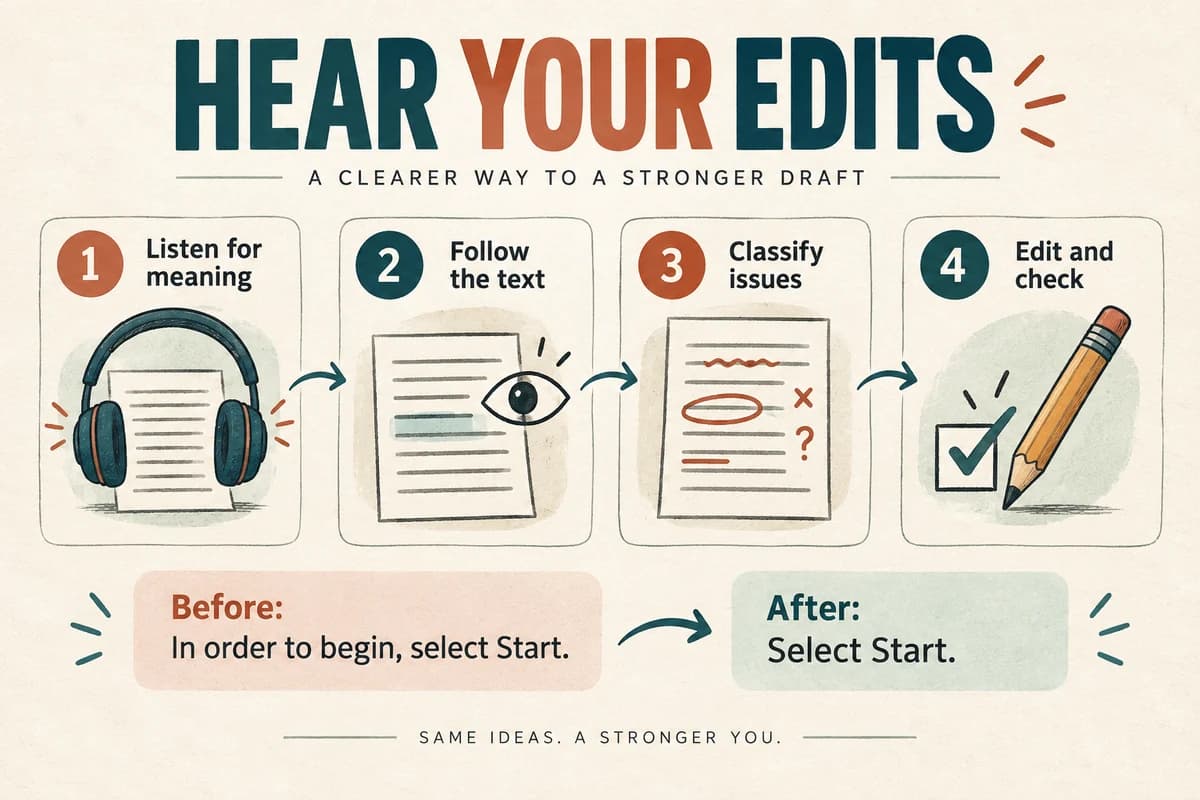
Use text-to-speech as a separate proofreading pass: listen to a stable draft, mark places that sound wrong or become hard to follow, and edit afterward. Audio can help you notice repetition, missing words, and awkward sentence structure, but it does not replace fact-checking or a final visual review.
The most useful approach is deliberate rather than continuous. If you stop to rewrite every sentence while listening, it becomes difficult to judge the flow of the complete passage.
Choose the right stage of the draft
Begin once the main structure is settled. Audio proofreading works best when you are checking how existing ideas connect, rather than deciding what the article should be about.
Save a named copy or revision before starting. This makes it possible to distinguish problems you heard from changes introduced during the editing pass.
Pick a manageable section: an introduction, one argument, or a complete set of instructions. Very short fragments conceal transition problems; very long passages make it hard to remember where an issue occurred.
You can use a speech-generation tool or a document reader. Microsoft documents Read Aloud options for listening to Word documents, with availability and controls depending on the version you use. Microsoft's guide to listening to Word documents.
For private material, choose a tool and handling process appropriate to that document. There is no need to turn a proofreading exercise into a public audio publication.
Listen once for meaning, without editing
On the first pass, let the passage play while you make brief notes. Use paragraph numbers or a simple timestamp if the playback tool provides one.
Record the kind of problem rather than a polished replacement:
- “Paragraph 2: who does ‘they’ refer to?”
- “Paragraph 4: same point appears twice.”
- “List item 3: instruction arrives before prerequisite.”
- “Closing sentence: promised example never appeared.”
This pass tests whether the writing makes sense in sequence. It is especially valuable for introductions that delay the point, explanations that assume missing context, and conclusions that introduce an entirely new topic.
Avoid interpreting every odd pronunciation as a writing error. Names, specialized terms, and abbreviations may be rendered unexpectedly even when the spelling is correct. Put those into a separate pronunciation list.
Listen again while following the text
The second pass focuses on wording. Follow the draft and mark omissions, accidental repetition, tense changes, and sentences that are difficult to parse.
Consider this fictional example:
“After the manager reviews the request, submit it to the manager for review.”
The sentence is grammatically possible but procedurally confused. Hearing it may make the repeated review more obvious. The correction requires understanding the process: perhaps the first person is a team lead and the second is an operations manager.
Another example:
“The checklist includes the cable the adapter and screen.”
Add punctuation and correct the list if necessary: “The checklist includes the cable, the adapter, and the screen.”
Do not rely on audio to distinguish homophones. “Their” and “there” may sound identical, so those errors still require visual proofreading.
Classify the issue before rewriting
Use four categories to keep edits focused.
Meaning: the reader cannot tell who acts, what happens, or why a claim follows.
Structure: the information appears in an unhelpful order, or the draft repeats an explanation without adding value.
Wording: a phrase is unnecessarily long, a sentence carries too many ideas, or a word is missing.
Pronunciation: the text is correct but the audio rendering needs a separate adjustment.
This distinction matters if you are preparing both a written article and a spoken script. A phonetic spelling that helps narration may be unsuitable in the published article. Keep display text and spoken-input text separate when necessary.
Our voice-over script template provides a place for those pronunciation and production notes without mixing them into the main copy.
Use a worked editing pass
Imagine the draft says:
“In order to facilitate a smoother onboarding experience for all individuals who are joining the team, it is recommended that the setup steps described below are completed before attending the initial welcome meeting.”
An audio pass might reveal that the action arrives late. A clearer revision is:
“Complete the setup steps before your first welcome meeting. That way, you can use the meeting to ask questions about your role.”
The revision changes the structure, not just the length. It names the reader's action, gives a deadline, and explains the purpose.
Now listen to the surrounding paragraph. If the previous sentence already explained the purpose, remove the repeated explanation. The best edit depends on context; shortening each sentence independently can make a document choppy.
For writing that will become audio, go further and review page-dependent phrases using our guide to adapting written guides.
Finish with checks audio cannot perform
After editing, review the text visually. Check names against reliable sources, verify numbers and dates, inspect links, and confirm that headings and lists are correctly formatted.
Read important claims against their evidence. A confident voice can make an unsupported sentence sound convincing, so fluency should never count as factual verification.
For instructions, test the actual sequence when practical. A sentence may sound clear while naming the wrong button or omitting a necessary prerequisite.
Listen to the changed paragraph one more time with the paragraph before and after it. This catches new repetition and transitions introduced by the edit. You usually do not need to regenerate an entire document to evaluate a small local correction.
Keep the routine lightweight: save a draft, listen for meaning, listen for wording, edit, and perform the final visual check. If you want to hear a short passage in a different delivery, try it in VocalCopyCat. The purpose is to create enough distance from your own words to judge whether they say what you intended.
Try Our Voice Clone Demo
Hear your words come to life
Choose a voice and try a short preview.
Listen to sample voices
Hear examples before choosing a voice. Generated results can vary with the script and reference sample.
Looking for another voice?
Explore the library and listen to a sample before you create.

Morgan Freeman

Stephen Hawking

Christiano Ronaldo

Donald Trump

Kokoro

Disney XD Announcer

Cute Japanese Girl
Vin

Adam Stone
Transform Your Content with AI Voice Technology Today
Try a short voice preview, then create speech and save your audio in a workspace built for your next project.
Generate Your Voice Now