
Turn Written Guides Into Audio People Can Follow
Adapt a written guide into useful audio with spoken transitions, clear steps, accessible companion text, and a manageable workflow for edits and future updates.
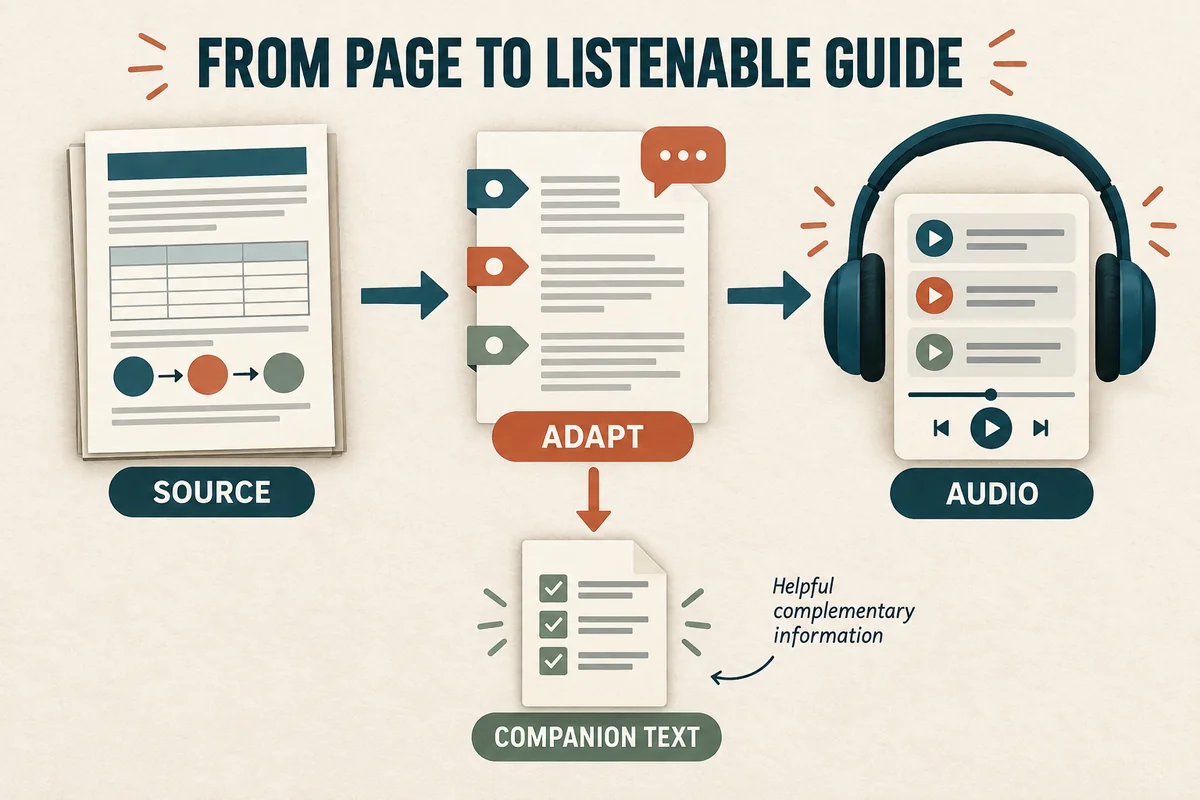
Turn a written guide into useful audio by adapting the structure for listening before generating speech. Keep the key instructions, replace visual references with clear descriptions, and give listeners enough context to know where they are and what they should do next.
A document can rely on headings, tables, links, and a reader's ability to scan backward. Audio unfolds in time. Your job is to decide which information needs to be spoken, which belongs in companion text, and how to make the relationship between them explicit.
Decide what kind of audio you are making
Choose one of three formats before rewriting.
A faithful reading stays close to the original. It suits material where exact wording matters, provided tables and other visual elements can be handled appropriately.
An adapted guide preserves the instructions but rewrites transitions and explanations for listening. It is useful for practical procedures and onboarding.
A summary gives the main ideas and points to the complete guide. Label it as a summary so listeners do not mistake an abbreviated version for the full instructions.
For a fictional guide to preparing a community meeting room, an adapted version might be most useful. Listeners need an ordered sequence and a way to pause between tasks. They probably do not need the document's revision history read at the beginning.
State the format and scope in the opening: “This audio guide covers room setup before guests arrive. The equipment inventory is available in the companion checklist.”
Audit everything that depends on the page
Mark references such as “above,” “in the right column,” “click here,” and “as shown in the diagram.” Decide what a listener needs to understand at each point.
A three-column table listing room type, seating capacity, and equipment could become a short comparison if there are only a few relevant entries. A long inventory is usually better offered as companion text with the key decision explained in audio.
For example:
Written: “Choose a configuration from Table 2.”
Adapted: “For a discussion with fewer than twelve participants, use the small circle arrangement. For a presentation, use rows facing the screen. The companion checklist shows the room layouts.”
This example is a fictional project instruction, not a universal room-planning rule. The important move is to state the decision clearly and identify where the visual detail can be found.
Give the listener a navigable sequence
Turn headings into spoken signposts. “Step two: test the equipment” is easier to locate mentally than a paragraph that starts with another unexplained instruction.
At the beginning, give a short route map: “We'll arrange the seats, test the screen, and prepare the welcome table.” At each transition, identify what has just been completed and what comes next.
Use pauses intentionally in your audio editor. A pause can give listeners time to act, but very long unannounced silence can sound like a broken file. For longer tasks, say “Pause here while you connect the screen. Continue when the display is visible.”
Offer separate tracks or chapters when the publishing environment supports useful navigation. Label each section with the task it covers rather than a vague “Part Two.” Keep the same section names in the companion document.
Rewrite sentences for one-pass understanding
Place the action before qualifications where possible. “Connect the display cable before opening the presentation” is easier to follow than “Before the presentation is opened, the display cable should have been connected.”
Split instructions that contain several decisions. If a sentence includes two exceptions, a parenthesis, and a reference to another page, it probably deserves a small sequence.
Expand ambiguous abbreviations and decide how numbers should sound. A range, date, or model identifier may need a different spoken form from its written label.
Read the draft aloud without looking at the original. When you lose the thread, mark the location. The problem may be missing context rather than a difficult voice.
Estimate the duration after adaptation, because the spoken version may be longer than the source. Our voice-over length and word-count guide shows how to include pauses and measured sample pace.
Keep audio and companion text useful together
Publish the audio near a clearly labeled text version or transcript. W3C describes transcripts as text equivalents that include the speech and other audio information needed to understand the content. Its guidance also recommends making transcripts easy to find from the media. W3C transcript guidance.
If your audio is an adaptation, distinguish the original source document from the transcript. Both may be helpful, but they serve different purposes. The transcript should represent what the listener hears, including any new explanations added during adaptation.
Use descriptive links in the companion material. “Equipment inventory” is more useful than “click here.” In the audio, direct listeners to a simple location such as “the checklist below the player,” provided that description matches the published page.
For lessons that combine narration and screen demonstrations, see AI voice-over for e-learning.
Test the actual task and plan updates
Give the audio and companion text to someone who has not helped write them. Ask them to complete a representative task without additional coaching.
Watch for practical failures: they cannot find the referenced checklist, a step arrives before the necessary equipment is ready, or the audio uses a name that differs from the label on the object.
Fix the script, regenerate the affected section, and listen to the transition into the next section. Keep a simple mapping from document section to audio file so later changes can be traced.
Store the source version, adapted script, approved audio, transcript, and review notes together. If the written guide changes, mark its audio counterpart for review instead of assuming the change is too small to matter.
Begin with one self-contained section in VocalCopyCat, then assemble and publish it through your usual editing and content tools. A short guide that works during the task is more valuable than a long reading that leaves listeners searching for the missing page.
Try Our Voice Clone Demo
Hear your words come to life
Choose a voice and try a short preview.
Listen to sample voices
Hear examples before choosing a voice. Generated results can vary with the script and reference sample.
Looking for another voice?
Explore the library and listen to a sample before you create.

Morgan Freeman

Stephen Hawking

Christiano Ronaldo

Donald Trump

Kokoro

Disney XD Announcer

Cute Japanese Girl
Vin

Adam Stone
Transform Your Content with AI Voice Technology Today
Try a short voice preview, then create speech and save your audio in a workspace built for your next project.
Generate Your Voice Now