
Estimate Voice-Over Length From Word Count and Pace
Estimate narration length with a word-count formula, measured sample pace, and a pause budget. Includes examples for short videos, lessons, and long scripts.
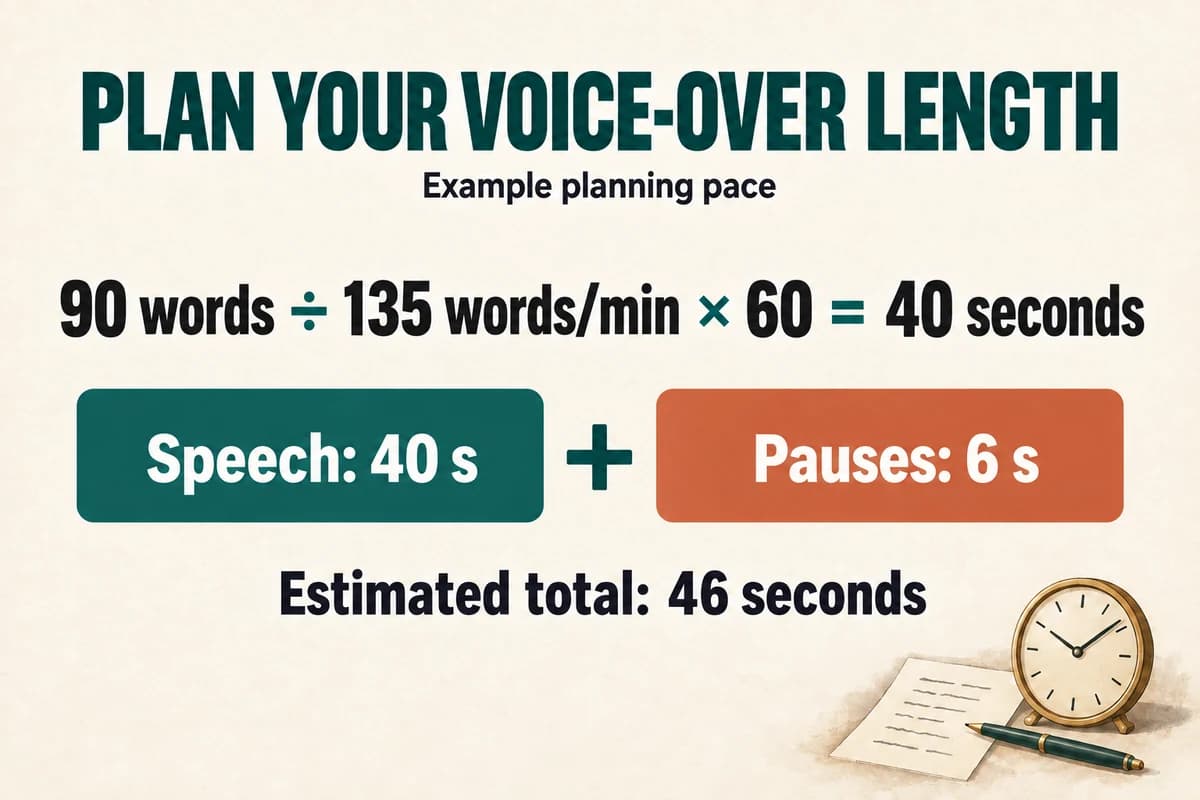
Estimate voice-over duration by dividing the number of spoken words by the planned words per minute, then adding time for pauses and non-speaking sections. For a useful estimate, measure a sample in the intended voice and style instead of treating one speaking rate as a universal standard.
The arithmetic is straightforward. The judgment lies in deciding what counts as spoken text and how much time the listener needs between ideas.
Use this basic duration formula
Estimated speech duration in seconds equals:
Spoken word count ÷ words per minute × 60
If a script contains 150 spoken words and the planning pace is 150 words per minute, the estimated speech duration is sixty seconds. That example is a calculation, not a claim that 150 words per minute is right for every narration.
For a 90-word script at an assumed 135 words per minute, the estimate is forty seconds. If the edit needs six additional seconds for pauses and a closing visual, plan for approximately forty-six seconds overall.
You can also work backward:
Available speech seconds ÷ 60 × words per minute = approximate word budget
Keep the result as a draft budget. The finished performance, pronunciation, and edit determine the actual duration.
Count the words the listener will hear
Exclude headings, scene IDs, comments, and production notes unless they are spoken. A script document's total word count can be misleading if half the page describes visuals.
Expand numbers and abbreviations before estimating. “2026,” “$24.50,” and “FAQ” each occupy little space on the page but may become several spoken words.
Decide the intended reading first. “FAQ” might be spoken as letters or expanded to “frequently asked questions.” A product code may be read character by character. A URL may need a simpler spoken alternative.
Use a voice-over script template with a dedicated spoken-text field. Count that field after pronunciation decisions are made.
For a short script, a few expanded terms can materially change the estimate. For a longer project, inconsistent handling of the same term can also make the delivery feel uneven.
Measure a representative sample
Choose a passage that reflects the actual project: not just a greeting, but a section with the same sentence lengths, terminology, and level of explanation.
Generate or record it using the intended delivery. Measure the duration in an audio editor, being clear about whether you included pauses.
For example, if a 120-word sample takes fifty-four seconds from its first spoken word to its last, its effective pace is about 133 words per minute:
120 ÷ 54 × 60 ≈ 133
Using that observed pace, a 300-word passage would take about 135 seconds, before any additional pauses not represented in the sample.
This is still an estimate. A later section full of serial numbers may behave differently from a narrative example. For mixed material, sample more than one type of passage and estimate those sections separately.
If the sample already includes natural sentence pauses, do not add the same pauses again. Reserve the additional pause budget for deliberate holds, demonstrations, or transitions.
Build a timeline budget for fixed-length projects
Suppose a video must last sixty seconds. The plan includes a four-second opening visual, six seconds for a demonstration without narration, and a five-second end card.
That leaves forty-five seconds for speech and its ordinary pacing. At a planning rate of 140 words per minute, the initial budget is about 105 spoken words.
A 150-word draft will not fit that budget simply because it appears on one page. You need to shorten the copy, change the visual allocation, or extend the video if the requirement allows it.
Write the sections as a time budget:
- Opening visual: four seconds.
- Narrated explanation: about twenty seconds.
- Demonstration: six seconds.
- Narrated next step: about twenty-five seconds.
- End card: five seconds.
Now test an actual draft. If the voice and visuals do not align, revise the relevant section rather than speeding up the entire file automatically.
Shorten the script without losing its purpose
Remove repeated ideas before cutting useful instructions. Replace introductory padding with the action: “In order to begin the process, you will need to select” can often become “Select.”
Keep prerequisites and exceptions that affect successful completion. A shorter tutorial that omits the required starting condition creates a different problem.
Replace a long list with one example and a clearly identified companion resource when the full list does not need to be spoken. Make sure the resource exists and that the listener knows where to find it.
If the script still does not fit, reconsider the scope. A thirty-second introduction may not have room for the product explanation, complete onboarding process, three benefits, and several calls to action.
For translated narration, measure a sample in the target language. Do not assume the same word count or pace will transfer. Our voice-over translation guide explains how to resolve timing while preserving meaning.
Answer common timing questions
How many words fit in a thirty-second voice-over? At an assumed 120 words per minute, the speech budget is sixty words; at an assumed 160, it is eighty. Both are arithmetic examples. Reduce the budget for deliberate pauses and confirm it with the actual voice.
Should I use word count or character count? Word count is convenient for this planning formula. Character counts may matter for a tool's input limits or billing, but they are a different measurement and do not directly determine duration.
Can I fix an overlong script by changing playback speed? An audio editor may offer time adjustment, but review the result for intelligibility and delivery quality. Rewriting or changing the edit may produce a better result.
Start with the formula, replace the assumed pace with a measured sample, and verify the final export. A short draft in VocalCopyCat can give you the evidence needed to turn a rough word budget into a realistic production plan.
Try Our Voice Clone Demo
Hear your words come to life
Choose a voice and try a short preview.
Listen to sample voices
Hear examples before choosing a voice. Generated results can vary with the script and reference sample.
Looking for another voice?
Explore the library and listen to a sample before you create.

Morgan Freeman

Stephen Hawking

Christiano Ronaldo

Donald Trump

Kokoro

Disney XD Announcer

Cute Japanese Girl
Vin

Adam Stone
Transform Your Content with AI Voice Technology Today
Try a short voice preview, then create speech and save your audio in a workspace built for your next project.
Generate Your Voice Now