
Organize Voice-Over Files, Revisions, and Approvals
Keep scripts, takes, edits, and approved exports easy to find with a folder structure, filename pattern, revision log, and practical audio handoff checklist.
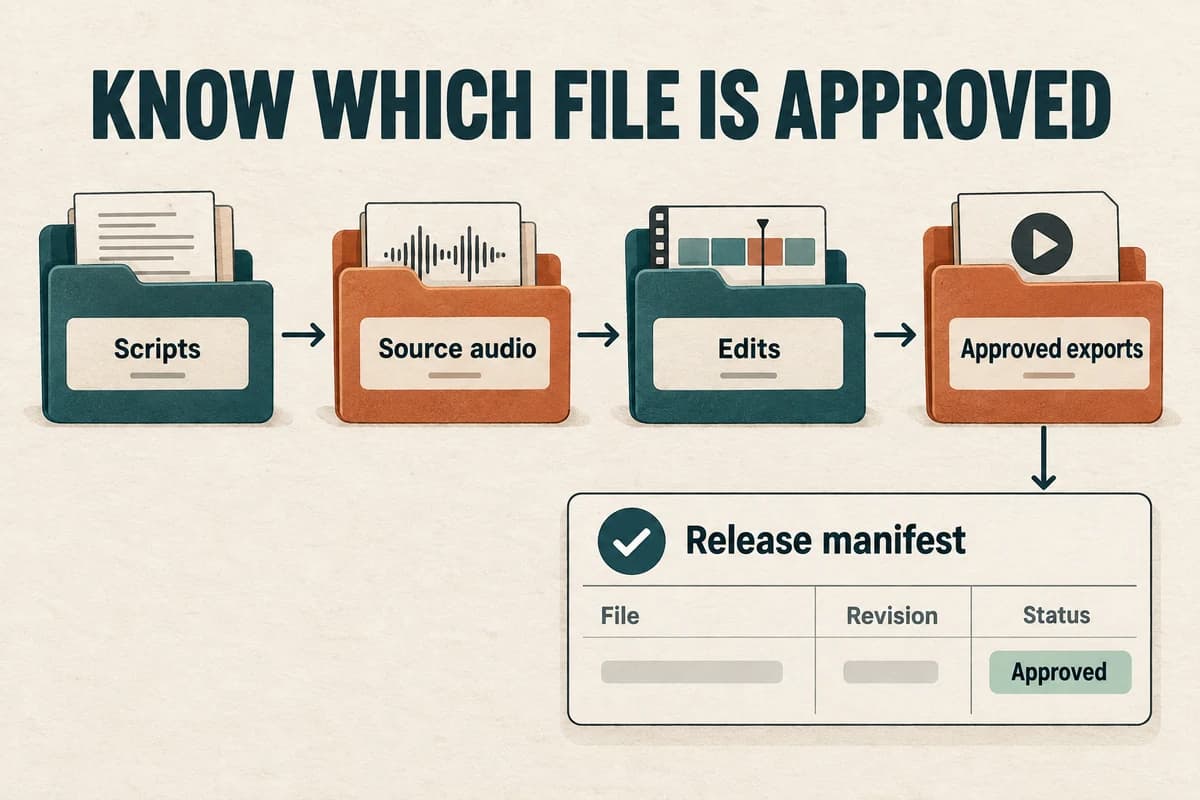
Organize a voice-over project around stable segment IDs, separate source and delivery folders, and a manifest that names the approved files. A filename should tell you what an asset is; the manifest should tell you whether it is ready to publish.
This prevents a familiar failure: the script is correct, the new audio is approved, but an older export with “final” in its name reaches the audience.
Give the project one clear home
Create a project folder with a short descriptive name and, if useful, a project code. Inside it, separate the stages of production:
- 01-brief: purpose, audience, destination, and review responsibilities.
- 02-scripts: source scripts and pronunciation notes.
- 03-source-audio: original recordings or generated outputs.
- 04-edit-projects: editor sessions and working assemblies.
- 05-review: files sent for comments.
- 06-approved: approved masters and release exports.
- 07-delivery-record: manifest and publishing notes.
These names are an example, not a required standard. Use fewer folders for a small project if each file's role remains clear.
Keep original audio intact. Make edits in your editing project or working copies so you can return to the source when a replacement does not work.
Name files with stable information
A practical pattern is:
project_segment_locale_scriptRevision_take_stage.extension
For example, “roomguide_S020_en-US_s03_t02_review.wav” identifies the project, segment, locale, script revision, take, and review stage.
Do not add a label your project does not need. A one-language podcast may omit the locale, while a multilingual course benefits from including it consistently.
Use segment IDs that survive script edits. If S020 explains the date field, it should remain S020 after its wording changes. Avoid using paragraph positions as identifiers when inserting a paragraph would renumber everything.
Distinguish the script revision from the audio take. A second generation from unchanged wording is a new take, while a changed sentence is a new script revision. This small distinction helps you understand which material an approved audio file actually contains.
The voice-over script template shows where to assign those IDs before production.
Maintain a manifest instead of relying on filenames
Use a spreadsheet or simple table with one row per deliverable. Include segment ID, script revision, source audio, edited export, reviewer, approval status, and destination.
A fictional row could read:
“Help video S020; script 3; take 2; export 4; reviewed by operations; approved; English help-center page.”
The manifest should identify the exact filename and, when relevant, the published URL. Avoid “latest file in the folder,” because folder order is not a reliable release instruction.
Keep statuses limited and clearly defined. Draft, ready for review, changes requested, approved, and published are enough for many small projects.
An approved audio segment is not necessarily a published deliverable. It may still need assembly, captions, technical export, or destination testing. Give those stages a place in the record if the project requires them.
Collect revisions in one issue log
Ask reviewers to use segment IDs and exact requested changes. Each issue should contain a location, description, owner, and resolution.
For example: “S030, sentence two: the button is now labeled Submit request. Replace Send request in the script and audio.”
Record whether the issue changes content, pronunciation, delivery, editing, or publishing. That determines who should act and what needs another review.
Avoid making competing edits from several chat threads. Consolidate the requested changes before producing replacements, especially when two reviewers have different preferences.
When replacing a line, preserve enough surrounding context to make a natural edit. Record the new source filename and the resulting export in the manifest. Do not overwrite an approved asset silently; create a new revision and mark the earlier one as superseded.
Build a clean handoff package
The receiving editor or publisher needs a small set of definite files, not every experiment from production.
Include the approved script, pronunciation decisions, required audio assets, any necessary editor project, the manifest, and delivery instructions. State which files are ready for release and which are references.
If the editor project depends on external media, package those dependencies using the editor's supported workflow or verify that every referenced file is included. Opening the project on another machine should not produce missing-media surprises.
For a publishing handoff, identify the intended page, language, title, and replacement behavior. “Upload this audio” is incomplete when several pages or locales exist.
After upload, check the actual destination and record the published asset. The handoff is complete when the right version is available where intended.
Archive with future corrections in mind
Keep the source script, original audio, editable project, approved master, release export, and manifest together. Decide who can make future changes and where those changes will be recorded.
For sensitive source recordings or permission documents, follow the project's agreed access and retention rules. Do not scatter unrestricted copies simply because storage is available.
Periodically verify that the archive can be opened and that its links or dependencies still resolve. A folder full of files is less useful if nobody can identify the approved version or open the editing project.
Use the voice-over quality checklist before marking a release complete. It connects content accuracy, technical checks, and published-file verification.
If you create narration in VocalCopyCat, download and record the outputs needed for your production archive. Your folder structure and manifest should remain understandable independently of any one generation or editing tool.
A modest system used consistently is enough: stable IDs, preserved sources, explicit revisions, and one authoritative record of approval. Those habits make the next correction a small edit instead of a search through “final-final” files.
Try Our Voice Clone Demo
Hear your words come to life
Choose a voice and try a short preview.
Listen to sample voices
Hear examples before choosing a voice. Generated results can vary with the script and reference sample.
Looking for another voice?
Explore the library and listen to a sample before you create.

Morgan Freeman

Stephen Hawking

Christiano Ronaldo

Donald Trump

Kokoro

Disney XD Announcer

Cute Japanese Girl
Vin

Adam Stone
Transform Your Content with AI Voice Technology Today
Try a short voice preview, then create speech and save your audio in a workspace built for your next project.
Generate Your Voice Now