
A Multilingual Voice-Over Workflow for Small Teams
Plan multilingual narration with locale briefs, approved translations, pronunciation samples, and a release checklist that keeps language versions organized.
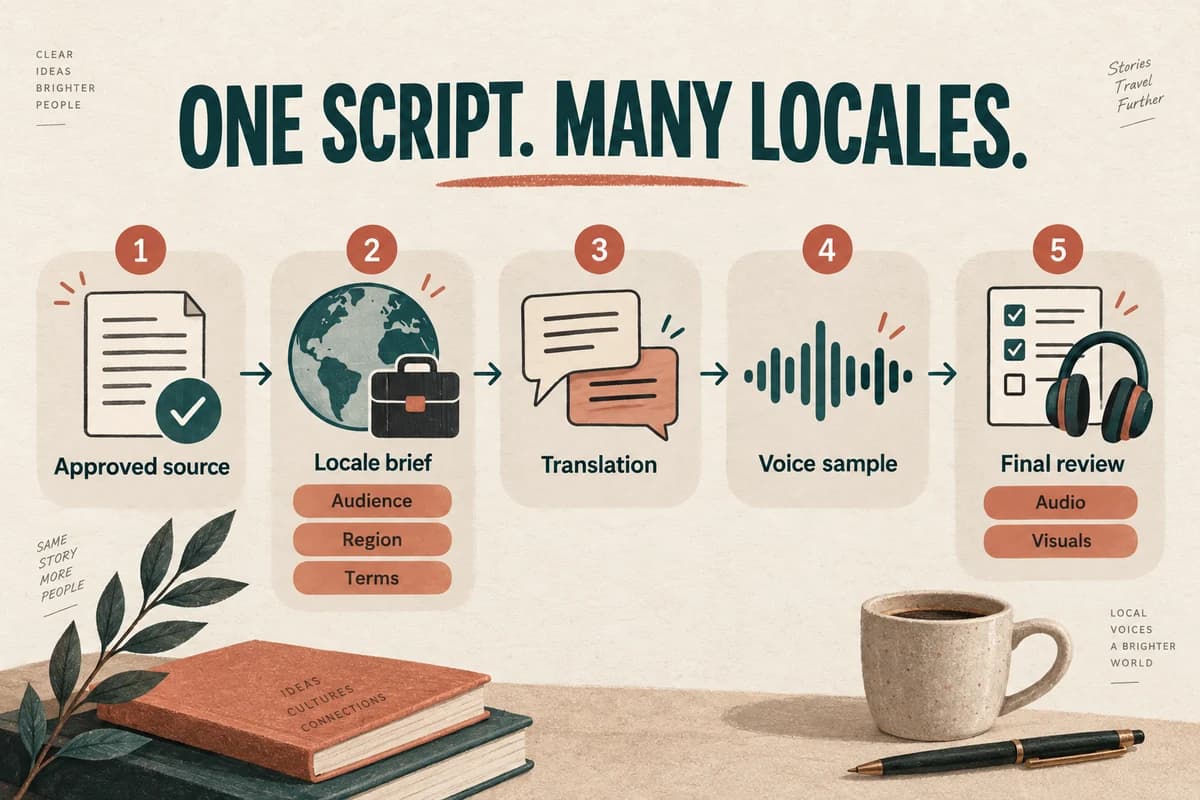
A reliable multilingual voice-over workflow starts with an approved source script, assigns a reviewer for each target locale, and keeps text, audio, and video revisions connected. Generate a representative sample before producing every language version, then review the final media in context.
The key planning unit is the locale: the language and regional audience you intend to address. “Spanish” or “English” alone may leave important decisions unresolved, including terminology, date formats, and the expected delivery style.
Define the deliverable for each audience
Create a brief for each version. Record the target locale, audience, channel, length constraints, voice approach, reviewer, and release date.
For a fictional product tutorial, the brief might say: “Spanish for customers in Mexico; first-time users; web help center; calm explanatory tone; interface remains in Spanish; local support team reviews terminology.”
Avoid using one vague instruction such as “make it sound international.” It gives translators and reviewers little basis for choosing words or resolving disagreement.
Localization includes more than translating sentences. W3C describes adaptations involving regional conventions such as dates, numbers, currency, and cultural references. W3C's explanation of localization.
Use that distinction to review the whole experience: voice, on-screen text, captions, linked resources, and the destination of the call to action.
Freeze a source script and build a glossary
Give each scene or paragraph a stable ID before translation. If the English wording changes, the ID still identifies the same scene across languages.
Collect recurring product names, feature names, interface labels, and technical terms in a glossary. Include their meaning and whether the display label should be translated. A list of words without context often creates new ambiguity.
Record pronunciation notes separately from spelling. A term can have an approved written form while requiring a specific spoken treatment.
For example, a fictional feature called “Quick Shelf” may remain a brand name in the interface. The narration can explain what it does in the local language while preserving that visible label. The decision should come from the product and locale reviewers, not be improvised during generation.
Approve the source before translating it. Every late source change potentially affects several scripts, audio files, captions, and exports.
Translate for the intended listening context
Give translators the scene ID, source wording, surrounding context, screenshots when relevant, and the purpose of each line. Include duration constraints as information, not as an instruction to sacrifice meaning.
A navigation prompt has a different job from a promotional opening. “Start here” could refer to a button, an instruction, or a slogan; context determines the right phrasing.
Ask the locale reviewer to read the translated script aloud before narration production. This catches phrases that are accurate on paper but awkward in speech.
Do not impose the source language's word count on every translation. Different phrasing may need different time. If a scene is constrained, ask for a shorter version that preserves the required action, or adjust the visual edit.
Our guide to translating voice-over scripts covers that adaptation step in more detail.
Pilot the hard parts in every language
Select a short sample containing a greeting, a technical term, a number, and an actual instruction. Use the voice and generation method planned for the full version.
Have the locale reviewer check the resulting audio, not only the script. Correct text does not guarantee correct pronunciation or a suitable delivery.
Give reviewers a concrete scorecard:
- Does the voice pronounce names and terms as intended?
- Is the instruction immediately understandable?
- Does the tone fit the audience and subject?
- Are numbers, abbreviations, and pauses clear?
- Does the sentence work beside the actual screen or visual?
Save each approved sample with the script revision and voice details available in your production process. Different languages need not sound mechanically identical; they should fulfill the same communication goal.
Confirm language and voice support in the chosen tool before planning the batch. Do not assume that support for one language implies support for every regional variant.
Produce and review in matched segments
Generate or record the approved segments, then assemble them in your audio or video editor. Keep original files separate from edited exports.
Review the localized version end to end. Check the timing of screen actions, captions, navigation cues, and the final call to action. A voice can be linguistically correct while arriving after the relevant visual has disappeared.
If the source script changes, mark the affected scene IDs across all locales. Let each reviewer decide how the change applies. A minor English word change might require no audio revision in another language, while a corrected product claim may require every version to be replaced.
Keep the review status explicit: translated, language approved, audio approved, media approved, released. These stages help the team avoid treating a translation approval as permission to publish an unchecked final export.
Release with an inventory and an owner
Create a manifest listing each locale, script revision, final media file, caption file, reviewer, and release status. The manifest should identify the approved version without relying on informal messages.
Use the voice-over file organization guide for naming conventions and correction logs. Add locale codes to distinguish files while keeping the same scene IDs.
Before release, verify the language label shown to users, the linked help resources, and any locale-specific contact details. Test the actual published page or player, because the correct file can still be attached to the wrong language option.
Assign someone to own future updates. A multilingual launch is easier to maintain when every source change has a clear route to language review.
You can explore a supported narration workflow in VocalCopyCat, beginning with the short approved sample. Translation, linguistic review, synchronization, and release control remain separate production responsibilities.
Try Our Voice Clone Demo
Hear your words come to life
Choose a voice and try a short preview.
Listen to sample voices
Hear examples before choosing a voice. Generated results can vary with the script and reference sample.
Looking for another voice?
Explore the library and listen to a sample before you create.

Morgan Freeman

Stephen Hawking

Christiano Ronaldo

Donald Trump

Kokoro

Disney XD Announcer

Cute Japanese Girl
Vin

Adam Stone
Transform Your Content with AI Voice Technology Today
Try a short voice preview, then create speech and save your audio in a workspace built for your next project.
Generate Your Voice Now