
How to Fix AI Voice Pronunciation Without Guesswork
Fix mispronounced names, brands, acronyms, and specialist terms with a small test script, pronunciation notes, contextual rewrites, and careful final checks.
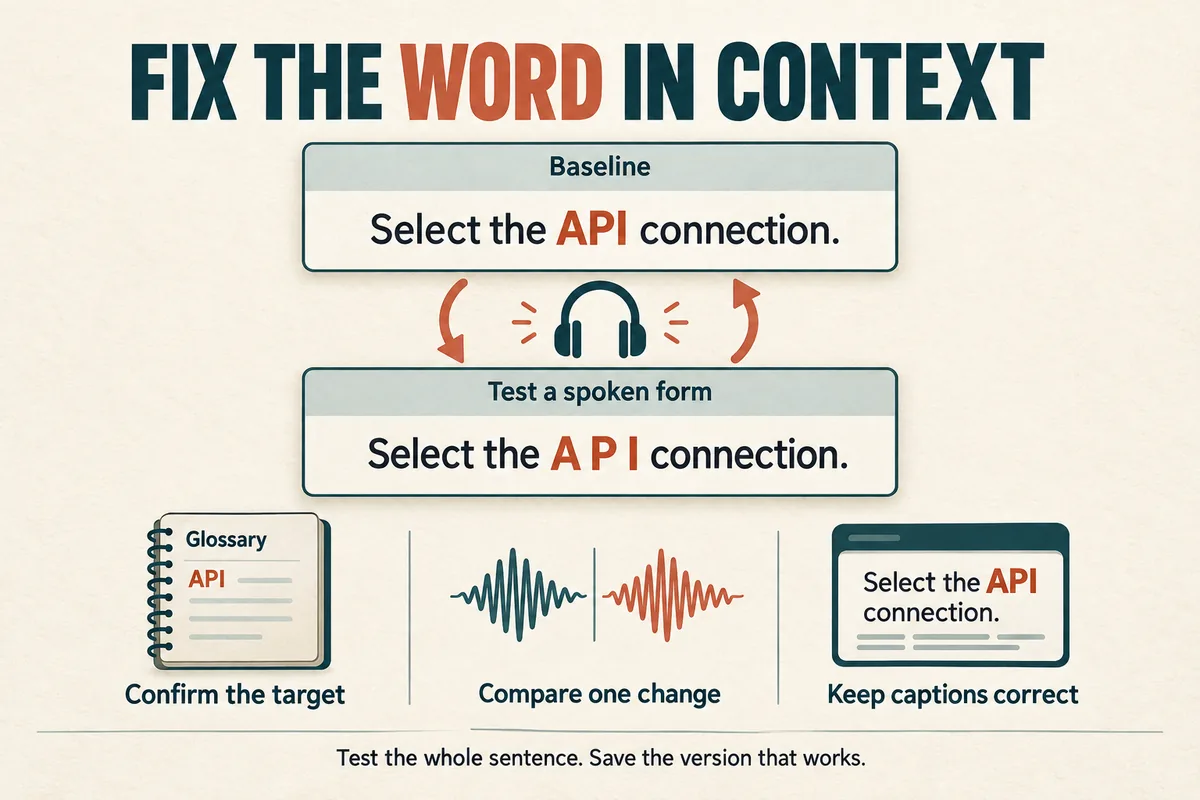
To fix AI voice pronunciation, isolate the problem word inside a short sentence, confirm the intended pronunciation, and test one change at a time. Start with clearer context or an expanded spelling. Use a tool's pronunciation controls only if they are actually available and documented.
Keep your reader-facing script separate from any spelling used to guide the voice. A temporary rendering such as “A P I” may help a generation, but your captions and published article should still use the correct written term.
Confirm the target before changing the script
A word can have more than one acceptable pronunciation. Names, regional terms, and acronyms are especially likely to create disagreements that are not technical errors.
Ask the person whose name appears in the script, consult the organization's own recorded material, or use an authoritative pronunciation resource for the subject. Write a plain note describing the intended version. If the pronunciation depends on region, record that choice too.
Do not assume the most familiar version is the only valid one. A brand team may have a preferred reading, and an interview guest may pronounce a surname differently from another person with the same spelling.
Make a list before generating the whole project: people, companies, places, abbreviations, product codes, and technical terms. Catching these early avoids replacing the same mistake across many scenes.
Build a small pronunciation test
Use a complete sentence with enough context to resemble the final narration. “Select the API connection for this workspace” is a better diagnostic than repeatedly generating “API” by itself.
Create a small comparison record:
| Version | Text change | What to listen for |
|---|---|---|
| A | Original sentence | Establish the baseline |
| B | Expanded term | Check whether the meaning is clearer |
| C | Letters separated | Test a letter-by-letter reading |
| D | Sentence rewritten | Check the term in simpler context |
Keep the same voice and other conditions while testing. Otherwise, a better result might come from an unrelated change.
Listen to the word and the surrounding phrase. A spelling trick that fixes the word but creates an awkward pause is not yet a finished solution.
Use context before unusual spelling
Some words change pronunciation with meaning. A sentence such as “Record the next segment” provides different context from “Open the record of the previous session.” If the voice gets the reading wrong, rewrite the sentence to make the meaning explicit.
For a difficult brand name, consider introducing it with a short descriptive phrase, then using a familiar noun later. “Open the Acme project manager. In the project manager, choose your workspace.” This can reduce repetition without hiding the important name.
Replace overly dense noun groups with ordinary spoken language. “The SQL API integration status” makes several pronunciation decisions arrive together. “Check the integration status. Then review the database connection” may be clearer if it preserves the intended meaning.
Do not delete necessary technical information just to avoid a difficult word. The objective is accurate narration that a listener can understand.
Expand abbreviations and numbers deliberately
Decide whether an abbreviation should be read as a word, as letters, or in full. Write that decision in a project glossary. A mixed approach can sound inconsistent even when each individual version is understandable.
For example, “FAQ” might be spoken as letters or replaced with “frequently asked questions,” depending on the sentence. “Version 2.1” might need “version two point one.” The correct choice comes from the meaning and audience.
Do not apply one global replacement to every occurrence without checking context. “St.” can represent different words, and a sequence of digits can be a quantity, year, code, or telephone number.
Use the worked examples in text to speech for numbers, dates, and acronyms to create a consistent spoken version.
Treat markup and phonetic spelling as tool-specific
Some speech systems support structured pronunciation instructions. SSML, for example, defines elements for pronunciation and text interpretation, but that does not mean every speech editor accepts them. The W3C SSML specification describes the standard.
Do not paste markup into an ordinary text box unless the tool documents support. It might be ignored, read aloud, or handled differently from what you expect.
A plain phonetic approximation can be tested when other options fail, but keep it in the generation copy only. Try a small change, listen, and record the version that worked. Avoid complicated punctuation experiments that make the sentence fragile.
If a term remains unreliable, consider a shorter sentence or another approved voice. For a critical name, a human review of the final audio is more valuable than assuming the latest generation fixed it.
Maintain a pronunciation glossary
A simple table can travel with every project:
| Written form | Intended spoken form | Context note |
|---|---|---|
| API | A P I | Read as separate letters |
| v2.1 | version two point one | Product version |
| 2026 | twenty twenty-six | Calendar year |
| 12B | twelve B | Room label in this script |
These entries are editorial choices for the example, not universal rules. Adapt them to your organization and audience.
Save the successful test sentence beside each difficult term. Future writers can see the context that produced an acceptable result. Keep captions and transcripts correctly spelled even if the generation text uses a workaround.
When rhythm still feels awkward after pronunciation is fixed, review punctuation for text to speech and natural AI voice delivery.
Pronunciation questions
Should I regenerate until the word sounds right? A second attempt can be informative, but repeated guessing is inefficient. Record what changed and keep an approved example.
Can punctuation force a pronunciation? Sometimes it changes phrasing, but it is not a universal pronunciation control. Test the whole sentence.
Who should approve specialist terms? A person familiar with the subject and intended audience. Ask them to review the final audio, because an accurate written script can still be pronounced incorrectly.
Try Our Voice Clone Demo
Hear your words come to life
Choose a voice and try a short preview.
Listen to sample voices
Hear examples before choosing a voice. Generated results can vary with the script and reference sample.
Looking for another voice?
Explore the library and listen to a sample before you create.

Morgan Freeman

Stephen Hawking

Christiano Ronaldo

Donald Trump

Kokoro

Disney XD Announcer

Cute Japanese Girl
Vin

Adam Stone
Transform Your Content with AI Voice Technology Today
Try a short voice preview, then create speech and save your audio in a workspace built for your next project.
Generate Your Voice Now