
Text to Speech for Numbers, Dates, and Acronyms
Write numbers, dates, prices, units, and acronyms for clear text to speech, with practical examples and a reusable checklist for consistent narration.
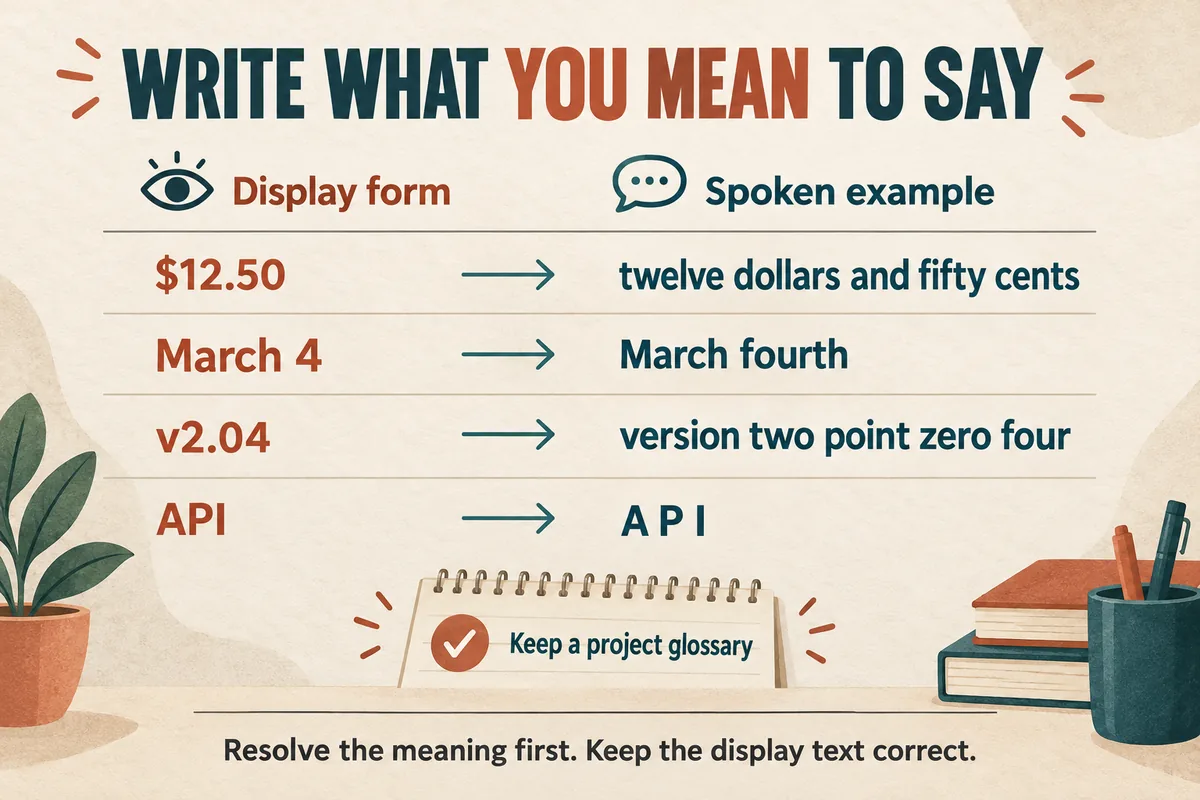
For reliable text to speech, write ambiguous numbers, dates, and acronyms the way you want them spoken. Decide what each item means before changing its spelling. The same digits can represent a quantity, a year, a version, a room number, or a telephone sequence.
Keep a correctly formatted display script alongside the spoken version. Your audience may need to see “$12.50” while hearing “twelve dollars and fifty cents.” Those two forms serve different purposes and can coexist in a well-organized project.
Identify the meaning of every number
Scan the script for digits before generating audio. Label each as a count, measurement, identifier, date, price, percentage, or version.
Consider “204.” In “We received 204 responses,” it is a quantity. In “Go to room 204,” it is an identifier. In a confirmation code, it may need to be read digit by digit. There is no single spelling that is best for all three.
Write the intended reading in a separate column:
| Display form | Example spoken form | Meaning |
|---|---|---|
| 204 responses | two hundred and four responses | Quantity |
| Room 204 | room two oh four | Local naming convention |
| Code 204 | code two zero four | Exact digit sequence |
| v2.04 | version two point zero four | Version identifier |
These are examples of editorial choices. Use the convention your listeners expect, and check any organizational preference for identifiers.
Remove ambiguity from dates and times
A date such as “03/04/2026” can mean different days in different regions. Resolve the intended date before narration. Writing the month name makes the meaning easier to review.
For example, use “March fourth, twenty twenty-six” when that is the intended date. Keep the display version consistent with the audience's locale.
Time needs the same care. “7:30” may need “seven thirty in the morning,” especially in a standalone announcement. Include the time zone when it changes what the listener should do. Avoid adding one by assumption.
For schedules, distinguish a duration from a clock time. “The session lasts one hour and thirty minutes” is different from “The session starts at one thirty.”
Read deadlines against the source document. A fluent voice reading the wrong day is still wrong, and the audio review should include factual checks as well as pronunciation.
Write prices, percentages, and measurements naturally
Decide the spoken level of detail from the task. A product walkthrough may need the exact price, while a general example may use a rounded hypothetical figure clearly labeled as such.
| Display form | Clear spoken example |
|---|---|
| $12.50 | twelve dollars and fifty cents |
| 8% | eight percent |
| 2.5 kg | two point five kilograms |
| 16:9 | sixteen by nine |
| 3–5 minutes | three to five minutes |
| 10 × 20 cm | ten by twenty centimeters |
Do not blindly replace every dash with “to.” A minus sign, a range, and a product identifier have different meanings. Likewise, “x” can represent multiplication, dimensions, or a letter in a name.
Check units with the subject expert when the distinction matters. “Milligrams” and “micrograms” are not interchangeable. For consequential instructions, require a qualified review of both the text and final audio.
You can avoid unnecessary spoken clutter by placing secondary details on screen, but do not remove information a listener needs to understand the main instruction.
Decide how each acronym should be read
Create a glossary that says whether an acronym is spoken as letters, as a word, or in full. “API” commonly calls for separate letters; other abbreviations may have several accepted readings within different communities.
On first mention, consider using the full term followed by the abbreviation if the audience is unfamiliar with it. Later mentions can use the shorter form. The best choice is the one that supports understanding without making every sentence cumbersome.
Test an acronym inside a normal sentence. A system may read it differently when it appears alone, next to a number, or inside a dense technical phrase.
If separating letters helps, keep that workaround in the generation script. Preserve the correct acronym in captions, titles, and documentation. Use the AI pronunciation workflow for stubborn terms and brand names.
Handle URLs, emails, and codes as special cases
Ask whether a URL needs to be spoken at all. In a video with a visible link and a description, “Use the link below the video” may be clearer than reading a long address.
If the exact address must be spoken, break it into understandable components and test the whole phrase. Avoid assuming that every punctuation mark will be pronounced.
For an email address, confirm whether the listener needs to hear “at,” “dot,” hyphens, or underscores. Display the correct written address at the same time when the format allows it.
For codes, distinguish letters that sound similar and verify the final recording against the original character by character. Do not change a real code to make it easier to narrate. Instead, add an appropriate explanation or a written reference.
A product demo script can often move these details into a readable screen element while keeping the narration focused.
Build a normalization pass into production
Before generating the final audio, search your script for digits, currency signs, percent signs, slashes, capitalized abbreviations, and units. Review each occurrence in context.
Do not rely on a global find-and-replace for everything. A replacement that fixes a version number may break a date in the next paragraph.
Generate a short test containing the difficult items, approve it, and keep it with the project glossary. Then listen to the final assembled audio because sentence context can change the result.
Use the punctuation guide to separate crowded information into manageable thoughts. Clear structure and deliberate spoken forms work together.
Questions about spoken numbers
Should every number be written in words? Not necessarily. Expand ambiguous or important items first, then verify the rest in audio.
Should captions spell out every number too? Use a readable, consistent caption style that matches what was actually said. The display form can differ from the generation text.
Can I trust a successful short test? It is a useful starting point, but still check the term in the final sentence and final exported audio.
Try Our Voice Clone Demo
Hear your words come to life
Choose a voice and try a short preview.
Listen to sample voices
Hear examples before choosing a voice. Generated results can vary with the script and reference sample.
Looking for another voice?
Explore the library and listen to a sample before you create.

Morgan Freeman

Stephen Hawking

Christiano Ronaldo

Donald Trump

Kokoro

Disney XD Announcer

Cute Japanese Girl
Vin

Adam Stone
Transform Your Content with AI Voice Technology Today
Try a short voice preview, then create speech and save your audio in a workspace built for your next project.
Generate Your Voice Now