
Punctuation for Text to Speech: A Practical Script Guide
Use punctuation to improve text to speech with examples for commas, periods, lists, questions, and pauses, plus a simple process for testing narration.
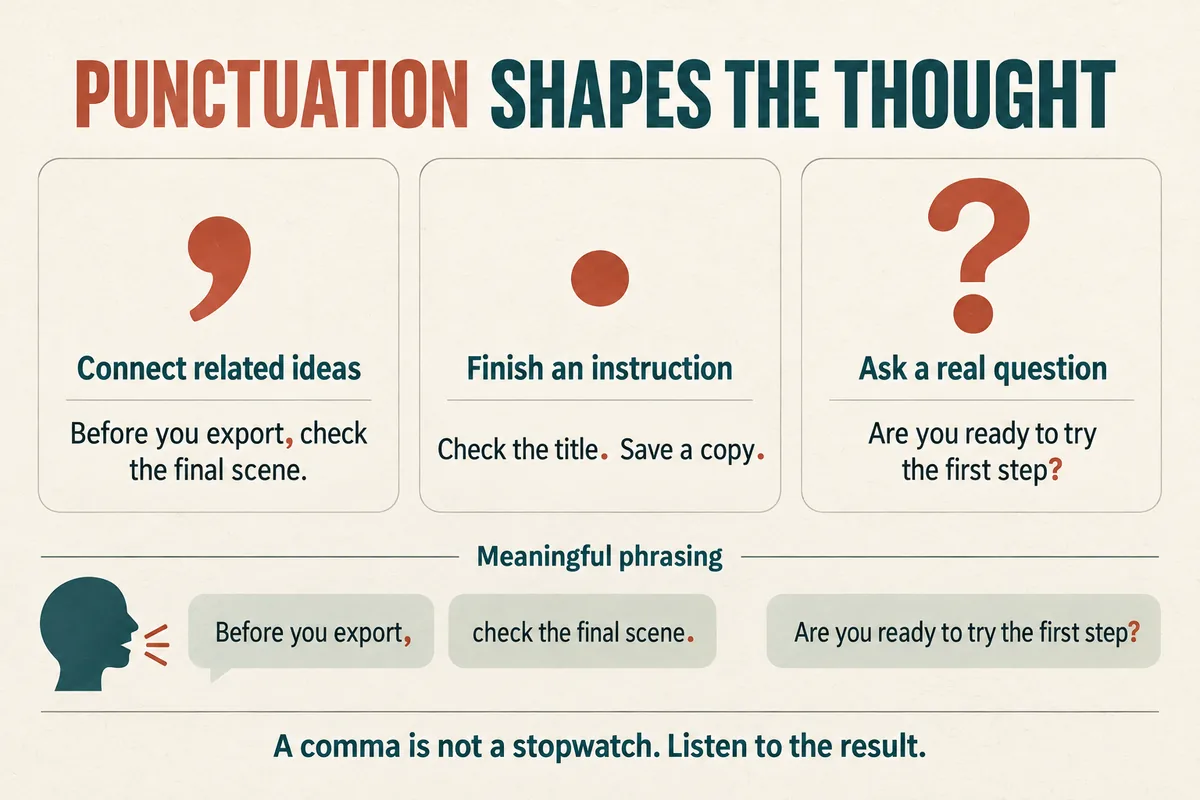
Punctuation helps a text-to-speech system interpret how a sentence is organized, but it is not an exact timing controller. Start with ordinary, clear punctuation. If a passage sounds rushed or strangely broken, rewrite its sentence structure and compare short generations.
A comma does not guarantee a particular pause length, and adding more punctuation does not guarantee more expression. The useful question is whether the listener understands the thought in the way you intended.
Use periods to separate complete instructions
Long instructions often sound better when divided into actions a listener can follow.
Before:
Open the folder, select the latest version, check the title, then save a copy before making changes.
After:
Open the folder and select the latest version. Check the title. Before making changes, save a copy.
Both versions are readable, but the second gives the narration clearer boundaries. Test it against the screen sequence: the best wording should leave enough time to perform each action.
Do not divide every phrase into a separate sentence. “Open. The folder. And select. The file.” can produce an unnatural rhythm and changes the grammatical structure. Keep words that belong together in the same thought.
A period is most useful when the idea is actually complete. If you need a longer visual hold after a sentence, handle that in your audio or video editor after generating the line.
Use commas for meaning, not as a metronome
Commas can clarify relationships within a sentence. They should not be scattered every few words as a substitute for writing a more manageable sentence.
Compare:
Before you export, check the final scene.
with:
Before, you export, check, the final scene.
The second version introduces breaks where the grammar does not support them. It can make a simple instruction harder to hear.
Lists are a useful place to test commas. “Choose a title, an image, and a short description” may work well as one sentence. A longer list with explanations may need separate sentences.
Listen for whether the list items sound distinct and whether the final item has a clear ending. If the voice rushes through the list, simplify the wording before adding unusual punctuation.
For broader script revisions, see how to make an AI voice sound natural.
Rewrite visual shorthand for the ear
Written documents contain symbols that are convenient to scan but ambiguous to speak. Slashes, ampersands, parentheses, and bullet labels deserve a deliberate pass.
Change “save/export” to “save or export” if that is the intended relationship. Change “design & review” to “design and review.” If the slash represents a rate, write the intended spoken phrase instead.
Parenthetical comments often interrupt narration. Move important information into a separate sentence:
Choose the standard option (recommended for new users).
becomes:
Choose the standard option. This is the suggested starting point for new users.
If the parenthetical note is only for the writer or editor, remove it from the generation text. Do not expect a speech tool to recognize every aside as a silent instruction.
Treat numbered lists similarly. Decide whether “one,” “two,” and “three” should be spoken, or whether the list should become a sequence of sentences.
Make questions and emphasis explicit
A question mark belongs on an actual question. Adding one to a statement to encourage an upward inflection can change how the message is understood.
If a question sounds flat, try making its meaning clearer: “Ready?” could become “Are you ready to try the first step?” Then listen to the new version.
For emphasis, improve the sentence before adding capitals or repeated exclamation marks. “This is the ONLY setting you need!!!” may produce an exaggerated reading. “You only need to change this setting” gives the voice a clearer structure.
Sometimes the emphasized word depends on context. “Save a copy before editing” highlights a precaution. “Edit the copy you just saved” highlights which file to use. Choose the sentence that communicates the intended point.
Use one consistent editorial style across the project so the voice does not swing between calm explanation and promotional excitement.
Treat ellipses, dashes, and markup as experiments
An ellipsis may suggest hesitation or a trailing thought, but its result varies. A dash may create a break, be ignored, or interact unexpectedly with neighboring text. Test these marks only when the ordinary sentence needs something they can plausibly express.
Do not build an entire script around an untested punctuation trick. If the output changes after a later edit, a fragile trick may stop producing the desired result.
Structured speech markup is a separate subject. SSML defines a break element for systems that support it; plain punctuation is not equivalent to that control. The W3C SSML specification explains the distinction. Check the tool's actual documentation before entering markup.
For precise scene timing, generate a natural reading first and adjust the placement of the audio in an editor.
Test a short passage and keep the readable original
Save two versions of the script when needed: the correct reader-facing version and the generation version containing approved pronunciation workarounds.
Use the same short passage for comparisons. Change one thing, generate it, and label the result. Compare “period instead of comma” separately from “new voice” or “shorter wording.”
Check names, numbers, and abbreviations during this pass. Punctuation cannot resolve every ambiguity in “03/04” or “202.” Use numbers, dates, and acronyms for text to speech for those decisions.
When a name remains wrong, use the pronunciation guide instead of endlessly rearranging commas around it.
Punctuation questions
Does a comma create a fixed pause? No. The result depends on the system and context. Listen to the generated sentence.
Can blank lines create longer pauses? Some tools treat them meaningfully; others do not. Use them to organize your script, then verify the output.
Should captions use the generation spelling? Usually they should use normal spelling and punctuation that accurately represent the spoken words. A phonetic workaround belongs in the generation copy, not automatically in the final caption file.
Try Our Voice Clone Demo
Hear your words come to life
Choose a voice and try a short preview.
Listen to sample voices
Hear examples before choosing a voice. Generated results can vary with the script and reference sample.
Looking for another voice?
Explore the library and listen to a sample before you create.

Morgan Freeman

Stephen Hawking

Christiano Ronaldo

Donald Trump

Kokoro

Disney XD Announcer

Cute Japanese Girl
Vin

Adam Stone
Transform Your Content with AI Voice Technology Today
Try a short voice preview, then create speech and save your audio in a workspace built for your next project.
Generate Your Voice Now